Trainee Guide
7. Notifications, and mobile access
This section explains how to manage notification preferences and access your training through the Moodle mobile application.
7.1 Managing Notification Preferences
Trainees can manage how they receive platform notifications according to their preferences.
To update notification preferences:
Open your user menu.
Select Preferences.
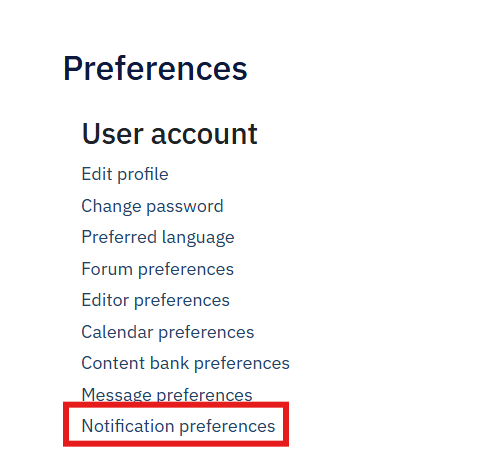
Open Notification Preferences.
Adjust the available settings according to your preferences.
7.2 Accessing the Mobile App
The Moodle mobile application allows you to access your learning activities from your mobile device and continue your training while on the go.
To access the platform through the mobile app:
Download the official Moodle App from the App Store or Google Play.
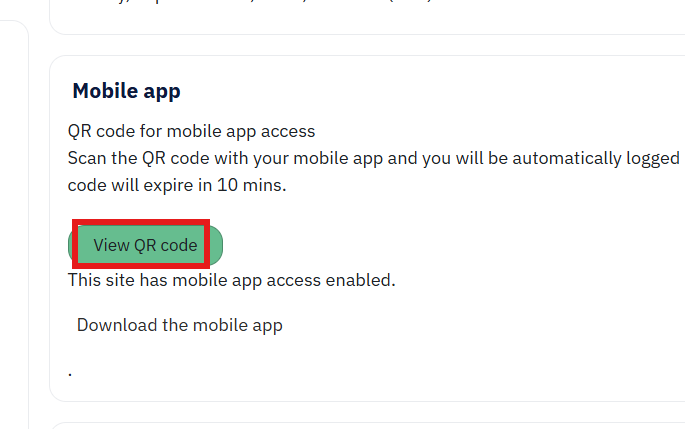
Open the mobile app and use the QR code provided on the platform to automatically connect to your organisation’s Moodle site.
Log in using your platform credentials.
Managing your notifications and accessing the Moodle mobile application helps you stay connected with your learning activities and receive important updates wherever you are.